> ## Documentation Index
> Fetch the complete documentation index at: https://docs.leaderos.net/llms.txt
> Use this file to discover all available pages before exploring further.
# Discord Webhooks
> Send fully customizable messages to your Discord server when an event of your choice is triggered.
## How can I add Discord Webhook?
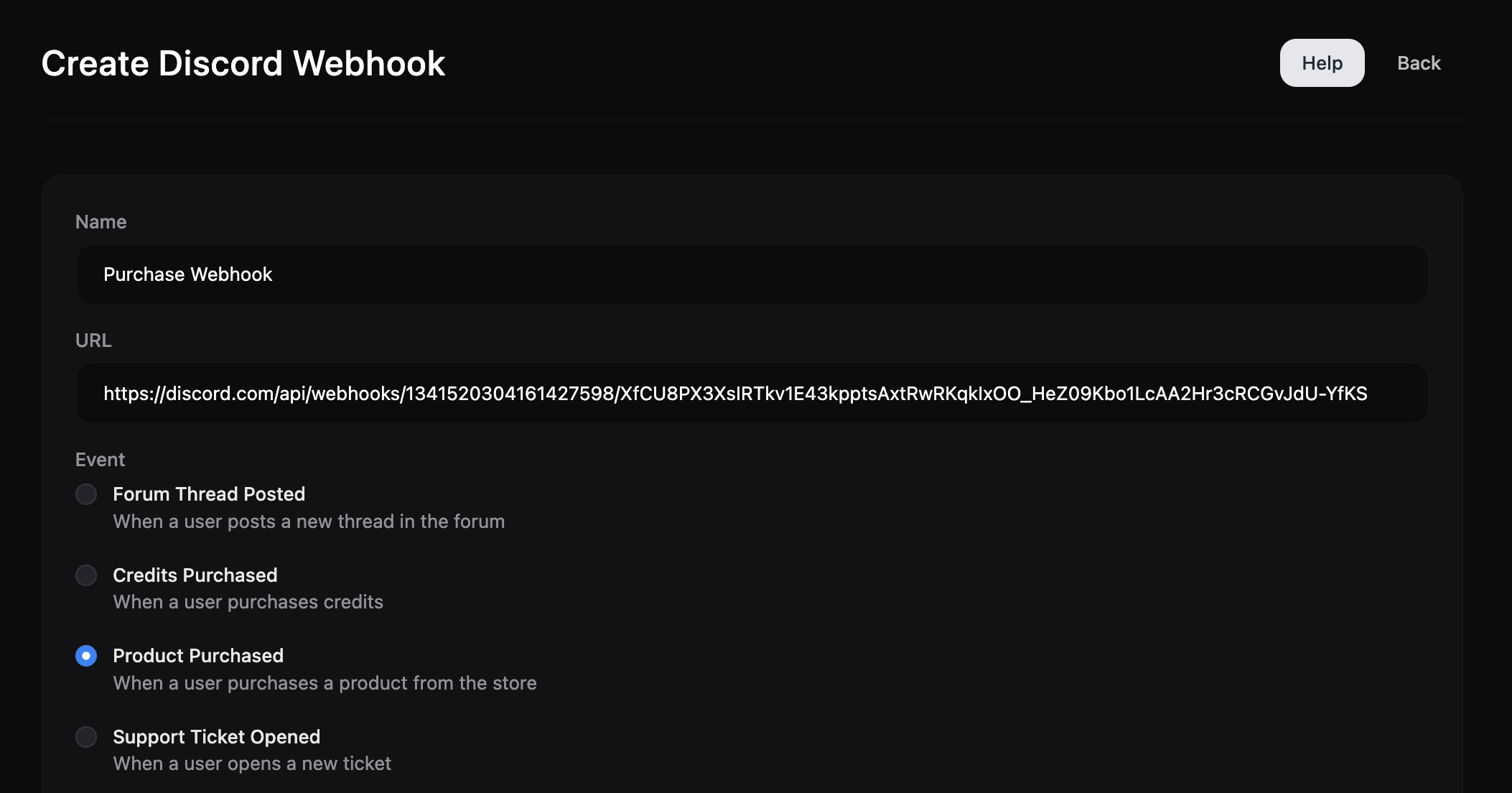
1. Go to Dashboard > Settings > Discord Webhooks > Create
2. Choose an event.
3. Enter Discord Webhook URL. [How can I get Discord Webhook URL?](#how-can-i-get-discord-webhook-url)
4. Enter Bot Name. Sets the name of the Webhook Bot that sends messages to your discord server.
5. Enter Bot Avatar image link. Sets the avatar of the Webhook Bot that sends messages to your discord server.
6. Now you can customize your message using Webhook Editor or JSON Editor.
## How can I get Discord Webhook URL?
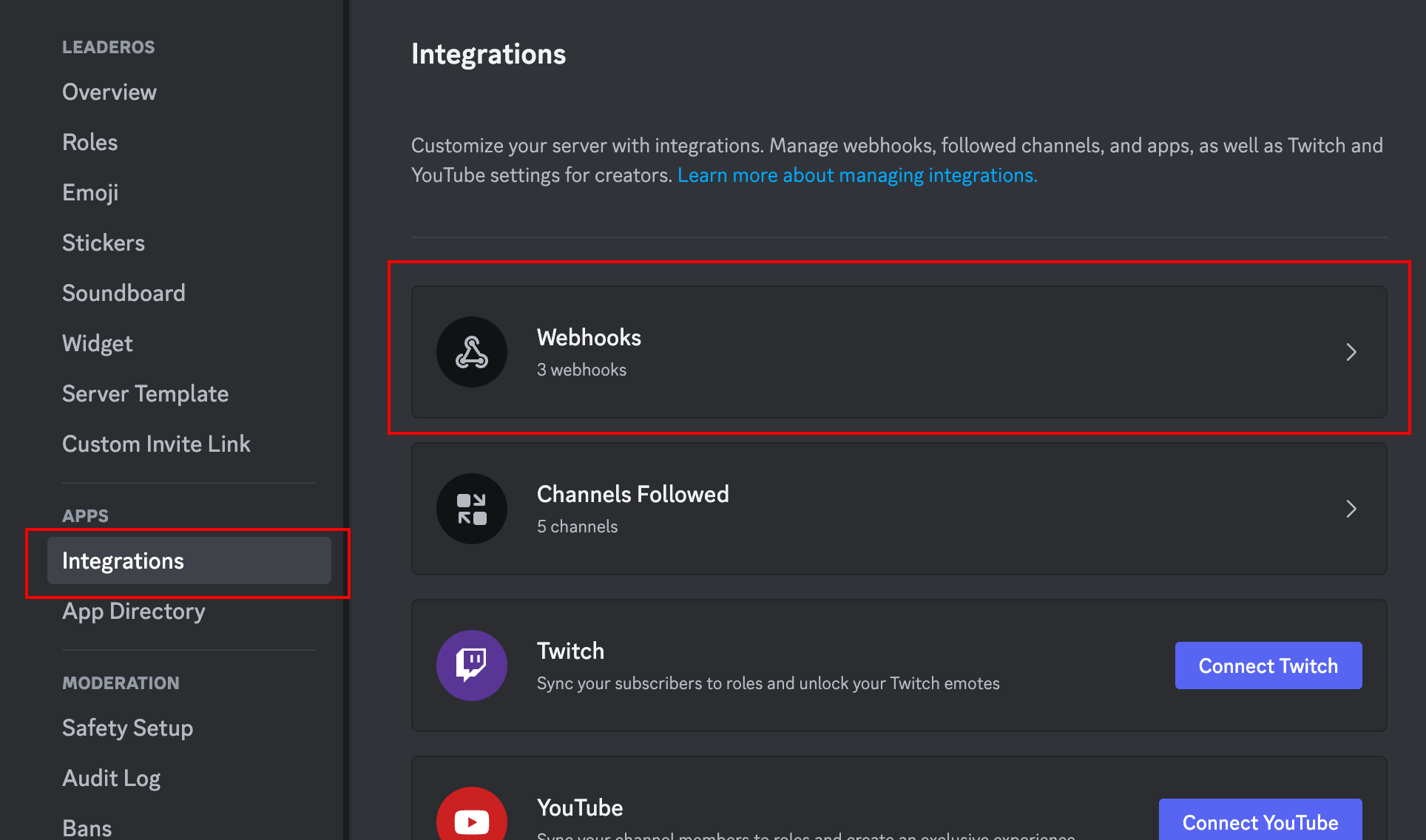
1. Go to **Discord Application > Server Settings > Integrations > Webhooks** page and click the "**New Webhook**" button.
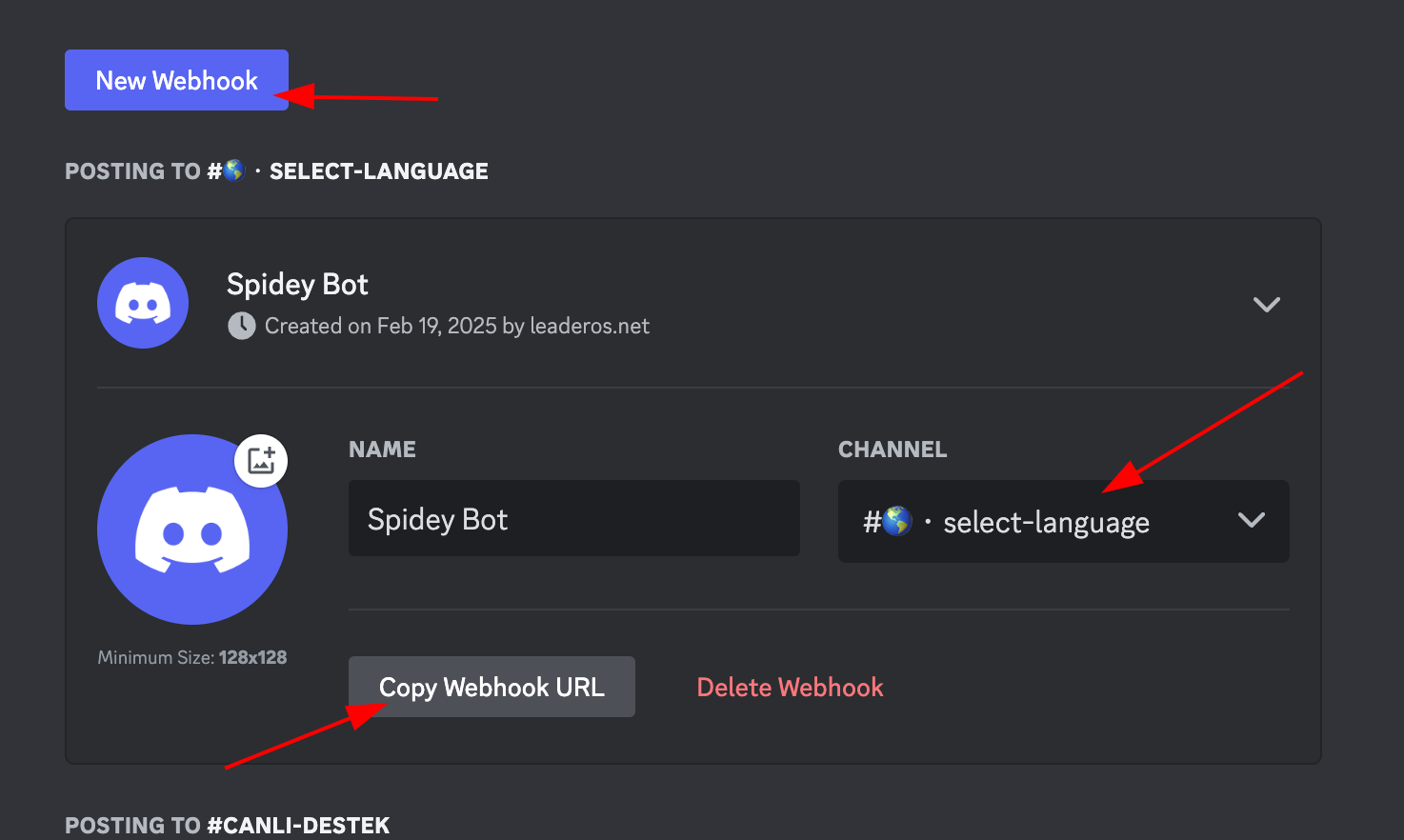
 2. Select the **channel** where the Webhook will be sent and click the "**Copy Webhook URL**" button.
 3. Enter this URL you copied into the "**URL**" field.
 ## Events
* **Forum Thread Posted**
## Events
* **Forum Thread Posted**
When a user posts a new thread in the forum.
| Variable | Description |
| ----------- | ---------------------- |
| \{username} | Username |
| \{title} | Title |
| \{url} | The URL of the thread. |
* **Credits Purchased**
When a user purchases credits.
| Variable | Description |
| ----------- | ----------- |
| \{username} | Username |
| \{credit} | Amount |
| \{credit} | Currency |
* **Product Purchased**
When a user purchases a product.
| Variable | Description |
| ----------- | ------------- |
| \{username} | Username |
| \{product} | Product Name |
| \{category} | Category Name |
| \{price} | Price |
| \{credit} | Currency |
| \{quantity} | Quantity |
* **Community Goal Reached**
When a community goal is reached.
| Variable | Description |
| -------- | ----------- |
| \{goal} | Goal Amount |
* **Support Ticket Opened**
When a user opens a new support ticket.
| Variable | Description |
| ----------------- | ---------------------- |
| \{username} | Username |
| \{title} | Title |
| \{category} | Category Name |
| \{message} | Message |
| \{dashboard\_url} | The URL of the ticket. |
* **Support Ticket Answered**
When a support ticket is answered.
| Variable | Description |
| ----------------- | ---------------------- |
| \{username} | Username |
| \{title} | Title |
| \{category} | Category Name |
| \{message} | Message |
| \{dashboard\_url} | The URL of the ticket. |
* **Support Ticket Replied**
When a support ticket is replied.
| Variable | Description |
| ----------------- | ---------------------- |
| \{username} | Username |
| \{title} | Title |
| \{category} | Category Name |
| \{message} | Message |
| \{dashboard\_url} | The URL of the ticket. |
* **Blog Post Published**
When a new blog post is published.
| Variable | Description |
| ------------ | -------------------- |
| \{username} | Username |
| \{title} | Title |
| \{content} | Content |
| \{category} | Category Name |
| \{thumbnail} | Post Thumbnail |
| \{url} | The URL of the post. |
* **Blog Post Commented**
When a user comments on a blog post
| Variable | Description |
| ----------------- | ----------------------- |
| \{username} | Username |
| \{comment} | Comment |
| \{title} | Title |
| \{url} | The URL of the post. |
| \{dashboard\_url} | The URL of the comment. |
* **Wheel of Fortune Won**
When a user wins a prize from the Wheel of Fortune
| Variable | Description |
| ----------- | --------------------- |
| \{username} | Username |
| \{name} | Wheel of Fortune Name |
| \{award} | Award Name |
* **Application Submitted**
When a user submits an application
| Variable | Description |
| ----------------- | --------------------------- |
| \{username} | Username |
| \{form\_title} | Form Title |
| \{dashboard\_url} | The URL of the application. |
* **Changelog Published**
When a staff publishes a new changelog
| Variable | Description |
| ----------- | ------------------------- |
| \{username} | Username |
| \{title} | Changelog Title |
| \{url} | The URL of the changelog. |