> ## Documentation Index
> Fetch the complete documentation index at: https://docs.leaderos.net/llms.txt
> Use this file to discover all available pages before exploring further.

# Tebex Store

> Connect your Tebex webstore to your LeaderOS website using the Tebex Headless API, giving your community access to over 120 local payment methods, and enjoy the benefits of chargeback protection!

## How can I connect my Tebex Store to LeaderOS website?

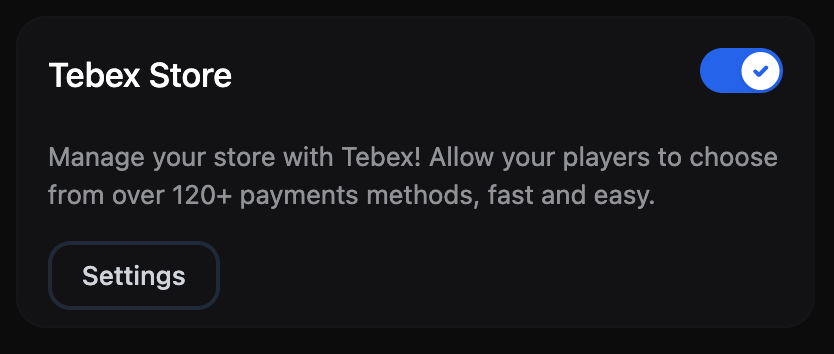
1. Enable Tebex Store module on LeaderOS Dashboard > Settings > Modules page.
   <img src="https://mintcdn.com/leaderos/0xlu5tyfK9CwPZaJ/images/using-leaderos/tebexstoremodule2.png?fit=max&auto=format&n=0xlu5tyfK9CwPZaJ&q=85&s=8436db4a8ad186edf95040199128afee" alt="Image" width="834" height="354" data-path="images/using-leaderos/tebexstoremodule2.png" />
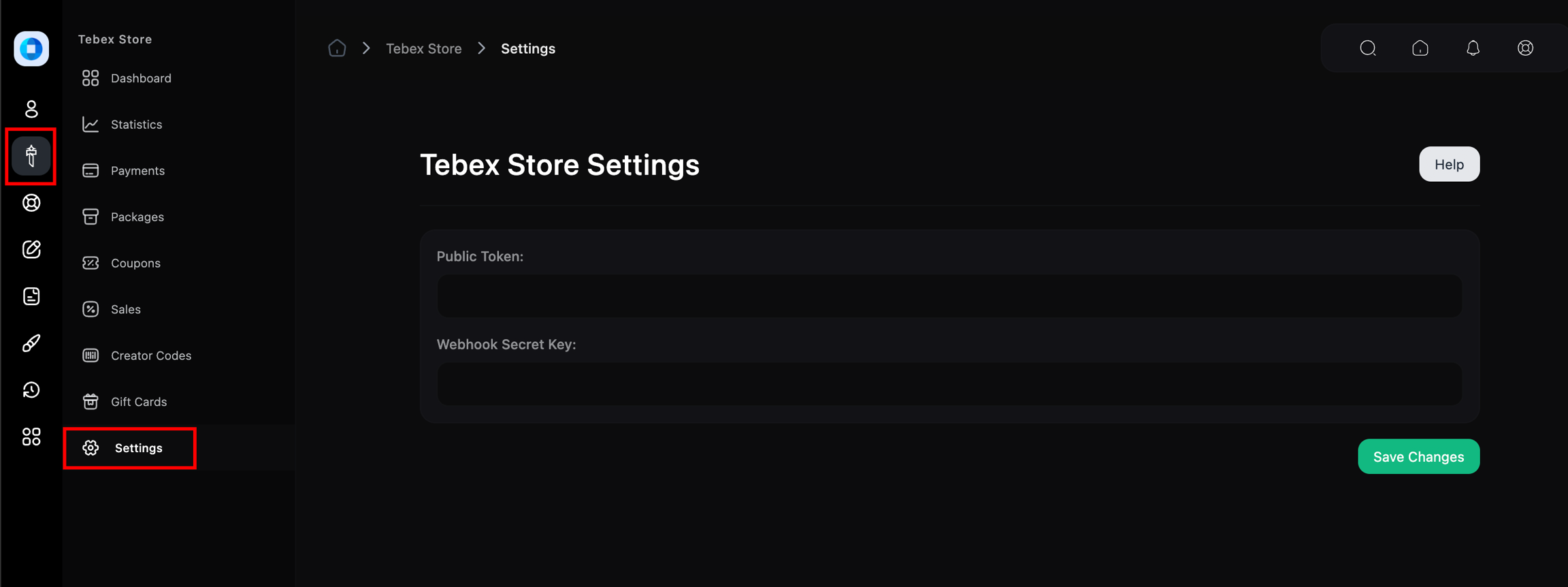
2. Go to LeaderOS Dashboard > Tebex Store > Settings page.
   <img src="https://mintcdn.com/leaderos/_vdpDres6pV6Ezva/images/using-leaderos/tebex-store-settings.png?fit=max&auto=format&n=_vdpDres6pV6Ezva&q=85&s=28de3520a4ed28b60139f2c9a69c7956" alt="Image" width="2304" height="862" data-path="images/using-leaderos/tebex-store-settings.png" />
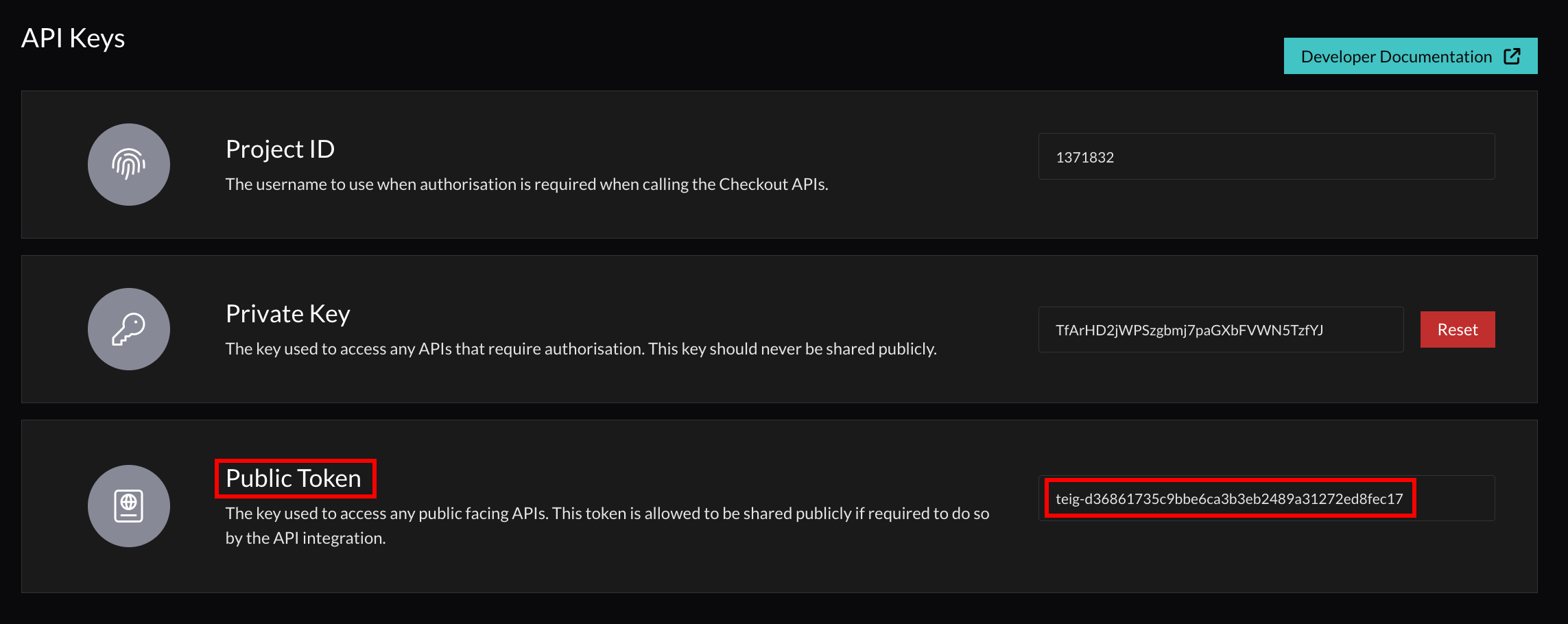
3. Enter your Public Token. You can find your Tebex Public Token on  [Tebex Creator Panel > Integrations > API Keys](https://creator.tebex.io/developers/api-keys)
   <img src="https://mintcdn.com/leaderos/_vdpDres6pV6Ezva/images/using-leaderos/tebex-store-api-keys.png?fit=max&auto=format&n=_vdpDres6pV6Ezva&q=85&s=69cb844dadf931b7eac9dc4c9ae57f45" alt="Image" width="2286" height="910" data-path="images/using-leaderos/tebex-store-api-keys.png" />
4. Enter your Secret Key. You can find your Tebex Secret Key on `Tebex Creator Panel > Integrations > Webhooks > Endpoints`

   <img src="https://mintcdn.com/leaderos/_vdpDres6pV6Ezva/images/using-leaderos/tebex-store-webhook-endpoints.png?fit=max&auto=format&n=_vdpDres6pV6Ezva&q=85&s=3c361d6d753793176198b6fa856db7f7" alt="Tebex Creator Panel > Integrations > Webhooks > Endpoints" data-og-width="2292" width="2292" data-og-height="398" height="398" data-path="images/using-leaderos/tebex-store-webhook-endpoints.png" data-optimize="true" data-opv="3" srcset="https://mintcdn.com/leaderos/_vdpDres6pV6Ezva/images/using-leaderos/tebex-store-webhook-endpoints.png?w=280&fit=max&auto=format&n=_vdpDres6pV6Ezva&q=85&s=3664254ebb3fd167555aa01126bfdd36 280w, https://mintcdn.com/leaderos/_vdpDres6pV6Ezva/images/using-leaderos/tebex-store-webhook-endpoints.png?w=560&fit=max&auto=format&n=_vdpDres6pV6Ezva&q=85&s=a06c589f3281e064aa430a72bac7cf0b 560w, https://mintcdn.com/leaderos/_vdpDres6pV6Ezva/images/using-leaderos/tebex-store-webhook-endpoints.png?w=840&fit=max&auto=format&n=_vdpDres6pV6Ezva&q=85&s=de8eaf77c522b8503857126f969c3682 840w, https://mintcdn.com/leaderos/_vdpDres6pV6Ezva/images/using-leaderos/tebex-store-webhook-endpoints.png?w=1100&fit=max&auto=format&n=_vdpDres6pV6Ezva&q=85&s=e89dfae4394b6af0645bbba5547f6c0b 1100w, https://mintcdn.com/leaderos/_vdpDres6pV6Ezva/images/using-leaderos/tebex-store-webhook-endpoints.png?w=1650&fit=max&auto=format&n=_vdpDres6pV6Ezva&q=85&s=8c98312f73cc13264ea922cdaecfa7d3 1650w, https://mintcdn.com/leaderos/_vdpDres6pV6Ezva/images/using-leaderos/tebex-store-webhook-endpoints.png?w=2500&fit=max&auto=format&n=_vdpDres6pV6Ezva&q=85&s=0a9c0d6b3456e0928da465d9e21c1876 2500w" />
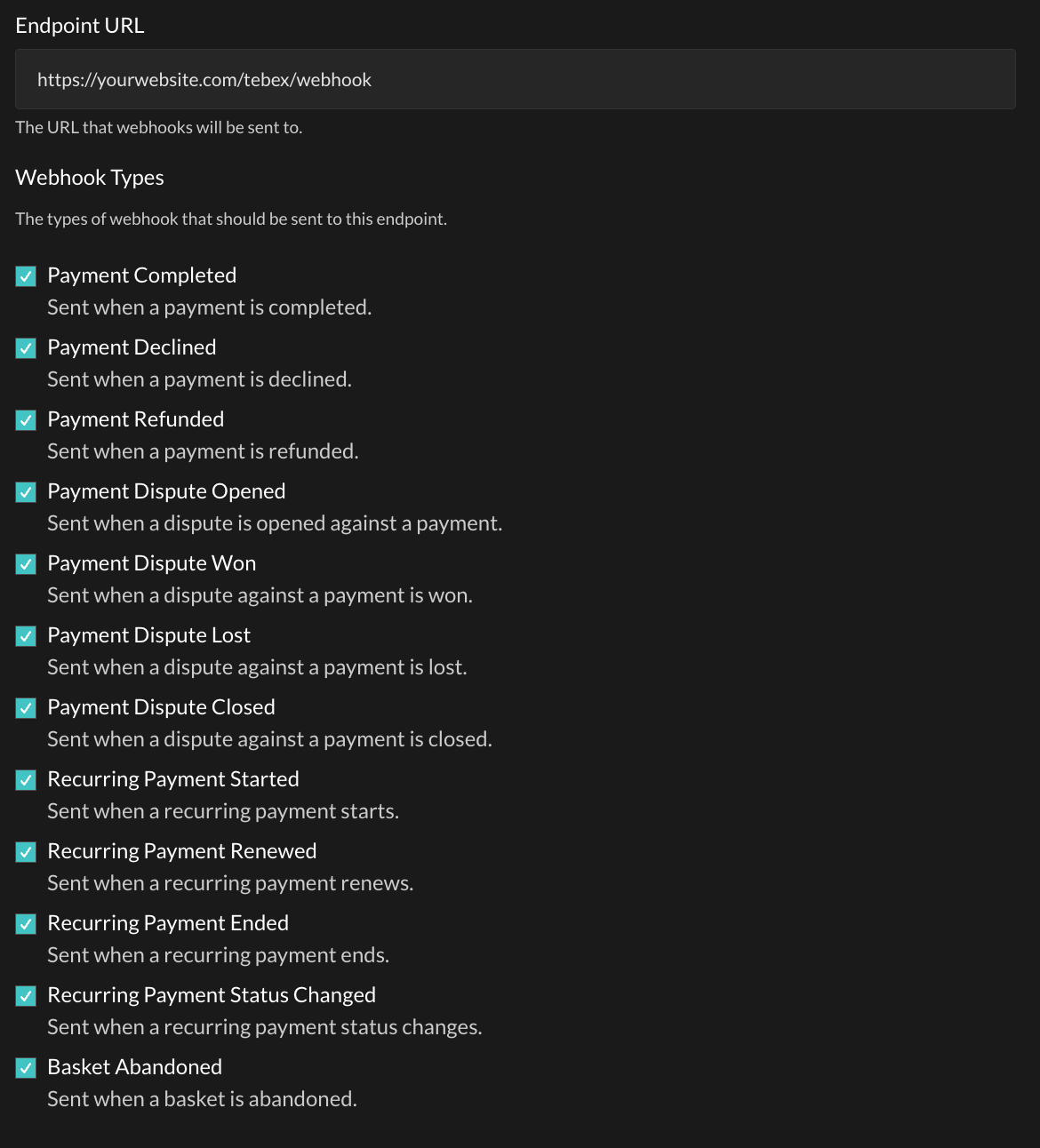
5. Add a new Webhook Enpoint on [Tebex Creator Panel > Integrations > Webhooks > Endpoints](https://creator.tebex.io/webhooks/endpoints)
   * Endpoint URL: `https://yourwebsite.com/tebex/webhook`
   * Webhook Types: Select all types
     <img src="https://mintcdn.com/leaderos/_vdpDres6pV6Ezva/images/using-leaderos/tebex-store-endpoint.png?fit=max&auto=format&n=_vdpDres6pV6Ezva&q=85&s=4afcf4dcfc5ba36882bb8287a87f4998" alt="Image" width="1170" height="1292" data-path="images/using-leaderos/tebex-store-endpoint.png" />
