> ## Documentation Index
> Fetch the complete documentation index at: https://docs.leaderos.net/llms.txt
> Use this file to discover all available pages before exploring further.
# Tebex Checkout
> Accept payments worldwide without chargeback hassles!
Tebex Checkout has 2 requirements for eligibility and use:
* Your business must have a minimum revenue of \$60,000 over the last 12 months.
* Your business is registered in the US/UK/EU/Israel Regions.
If you not meet these requirements, you can use [Tebex Store](/integrations/tebex-store) instead.
Please remember that Tebex Store and Tebex Checkout are different systems. Before using Tebex Checkout, make sure to create a Tebex Checkout project on Tebex.
[https://creator.tebex.io/webstores/tebex-checkout/create](https://creator.tebex.io/webstores/tebex-checkout/create)
Go to **Settings > Payment Methods** page, and fill in the fields.
| Settings | Description |
| ---------- | ------------------------------------------------------------------------------------------------------------------------------ |
| Username | Tebex Checkout Username [https://creator.tebex.io/payment-methods/settings](https://creator.tebex.io/payment-methods/settings) |
| API Key | Tebex Checkout API Key [https://creator.tebex.io/payment-methods/settings](https://creator.tebex.io/payment-methods/settings) |
| Secret Key | Webhook Secret Key [https://creator.tebex.io/webhooks/endpoints](https://creator.tebex.io/webhooks/endpoints) |
## How can I setup Tebex Checkout?
1. Go to [Tebex > Payments > Checkout Settings](https://creator.tebex.io/payment-methods/settings)
2. Find Checkout API Key section and copy to clipboard your **"Username"** and **"API Key"**.
3. Go to [Tebex > Integrations > Webhooks > Endpoints](https://creator.tebex.io/webhooks/endpoints)
4. Copy the "Secret Key".
 5. Enter the copied Username, API Key, and Secret Key into Dashboard > Payment Settings > Tebex Checkout page, and click the "Save Changes" button. **Do not proceed to the next step without saving these changes!**
6. Now, you need to setup Webhook to process payments. Click the **"Add Endpoint"** on Webhook Endpoints page.
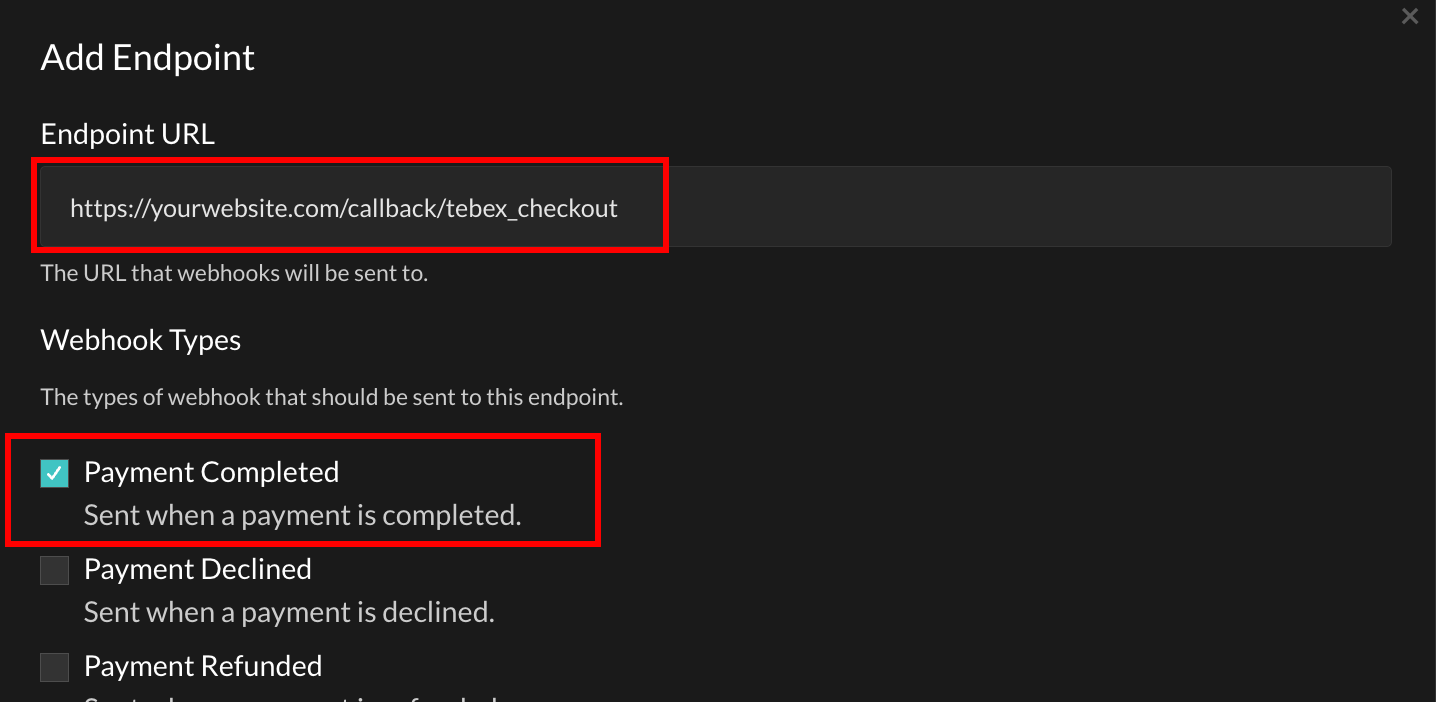
7. Enter your Endpoint URL and check the "Payment Completed" type. **Please replace "yourwebsite.com" with your actual website address.**
* **Endpoint URL:** `https://yourwebsite.com/callback/tebex_checkout`
* **Webhook Types:** `Payment Completed`
5. Enter the copied Username, API Key, and Secret Key into Dashboard > Payment Settings > Tebex Checkout page, and click the "Save Changes" button. **Do not proceed to the next step without saving these changes!**
6. Now, you need to setup Webhook to process payments. Click the **"Add Endpoint"** on Webhook Endpoints page.
7. Enter your Endpoint URL and check the "Payment Completed" type. **Please replace "yourwebsite.com" with your actual website address.**
* **Endpoint URL:** `https://yourwebsite.com/callback/tebex_checkout`
* **Webhook Types:** `Payment Completed`