> ## Documentation Index
> Fetch the complete documentation index at: https://docs.leaderos.net/llms.txt
> Use this file to discover all available pages before exploring further.
# Staff Applications
> With our application system you can receive new staff applications with your website and review their applications.
### How to create a Staff Application Form?
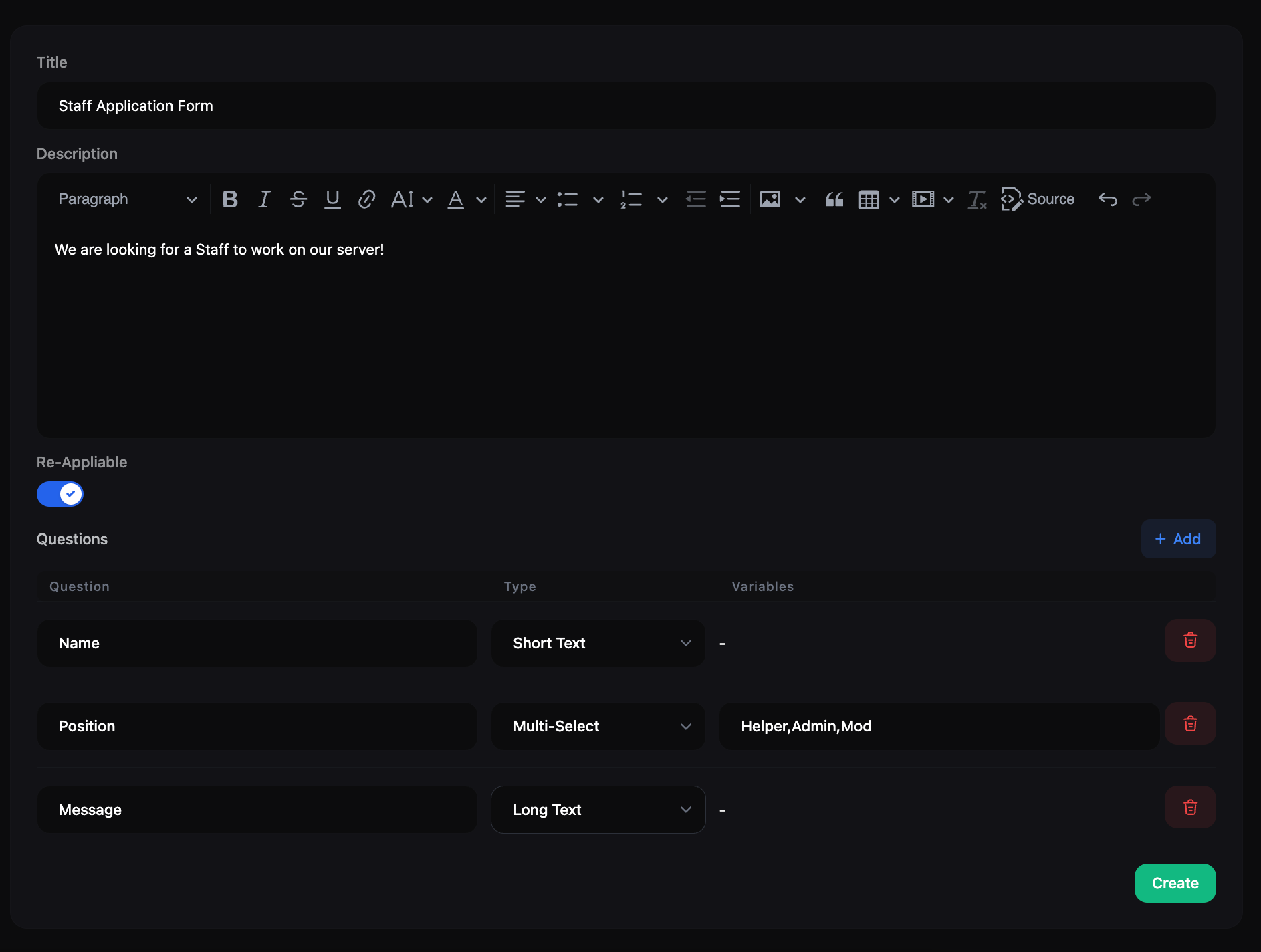
You can create a custom form on **Dashboard > Forms > Applications Forms > Add New**.
* **Title:** The title of the form.
* **Description:** The description of the form. You can use HTML tags to format the description.
* **Re-Appliable:** If you enable this option, users can submit the form multiple times.
* **Questions:** You can add questions to the form. You can add the following types of questions:
* **Short Text:** A single line text input.
* **Long Text:** A multi-line text input.
* **Single-Select:** A single-select dropdown. You can add options by separating them with a comma.
* **Multi-Select:** A multi-select dropdown. You can add options by separating them with a comma.
**Example to create a Application Form:**
 ### How to review application submissions?
You can review application submissions on **Dashboard > Forms > Applications**. You can click on the **"View"** button to see the details of the submission.
You can accept or reject the submission by clicking on the **"Accept"** or **"Reject"** button.
If you reject a submission and the form is re-appliable, the user can submit the form again.
### How to see the application form on your website?
After creating a application form, you can see it on **Dashboard > Forms > Applications Forms**. You can click on the **"View"** button to see the form on your website.
### How to add a application form to Header Menu?
After creating a application form and copying the URL, you can add it to the Header Menu on **Dashboard > Appearance > Header**.
### How to review application submissions?
You can review application submissions on **Dashboard > Forms > Applications**. You can click on the **"View"** button to see the details of the submission.
You can accept or reject the submission by clicking on the **"Accept"** or **"Reject"** button.
If you reject a submission and the form is re-appliable, the user can submit the form again.
### How to see the application form on your website?
After creating a application form, you can see it on **Dashboard > Forms > Applications Forms**. You can click on the **"View"** button to see the form on your website.
### How to add a application form to Header Menu?
After creating a application form and copying the URL, you can add it to the Header Menu on **Dashboard > Appearance > Header**.