> ## Documentation Index
> Fetch the complete documentation index at: https://docs.leaderos.net/llms.txt
> Use this file to discover all available pages before exploring further.
# Bulk Discount
> Set discounts for multiple products at once in your store.
### How to make a discount for multiple products at once?
Go to **Dashboard > Store > Bulk Discount**. You can set discounts for multiple products at once in your store by providing the following information:
* **Discount Status:** Enable or disable the discount.
* **Discount (%):** Enter the discount percentage.
* **Duration Status:** You can apply either a Permanent or a Temporary discount.
* **Permanent:** The discount will be applied permanently.
* **Temporary:** You can set the end date for the discount. The discount will be applied until the end date.
* **Products:** You can set the discount for all products or select specific products.
* **All Products:** The discount will be applied to all products.
* **Specific Products:** Select the products for which you want to set the discount. It is feasible to simultaneously choose multiple items and conduct a search by product name. You can also choose whole categories to apply the discount to every product in that category.
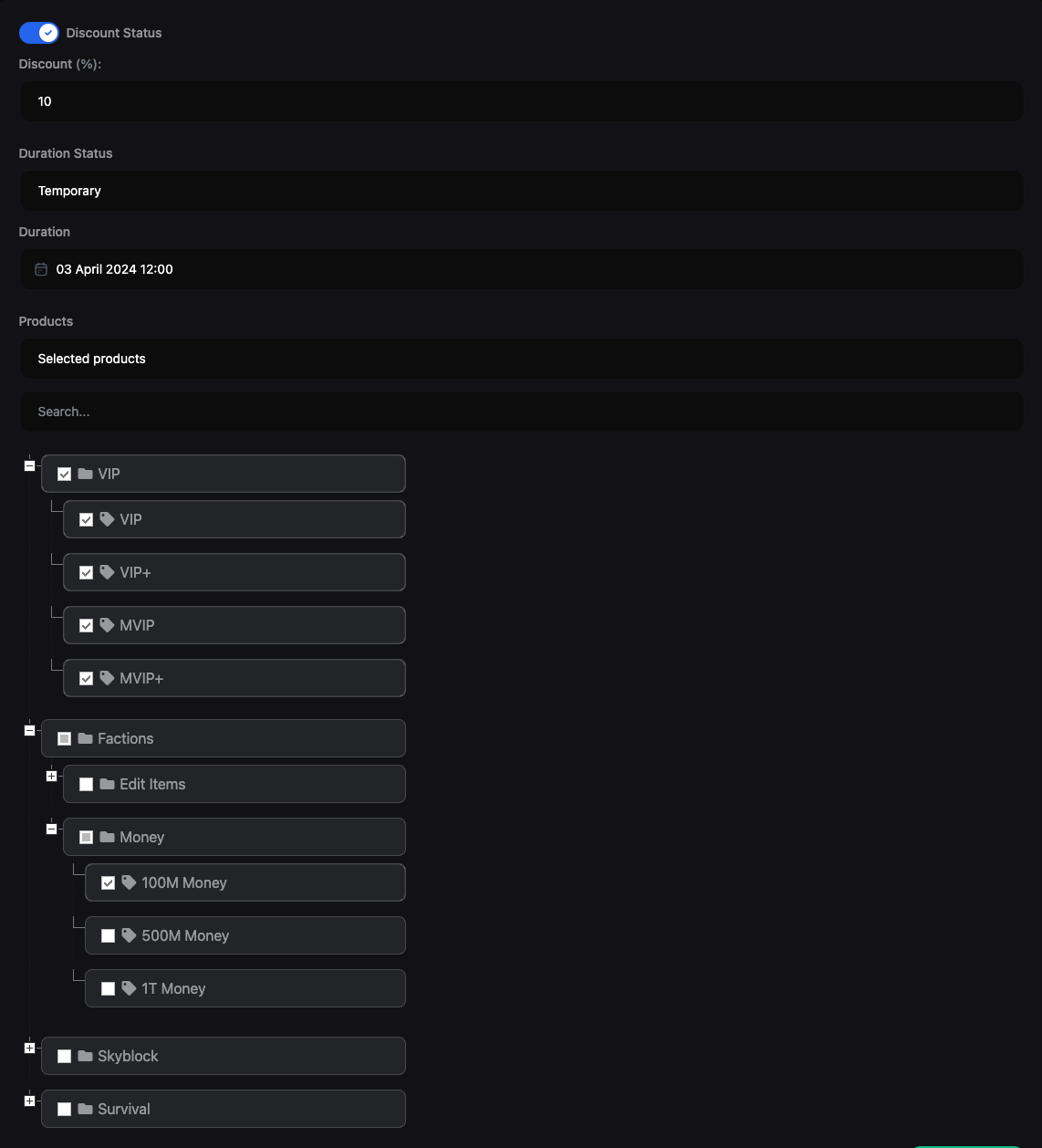 You can choose whole categories to apply the discount to every product in that category.